 Masjidi
Masjidi Home
Turn an old tablet into a prayer display.
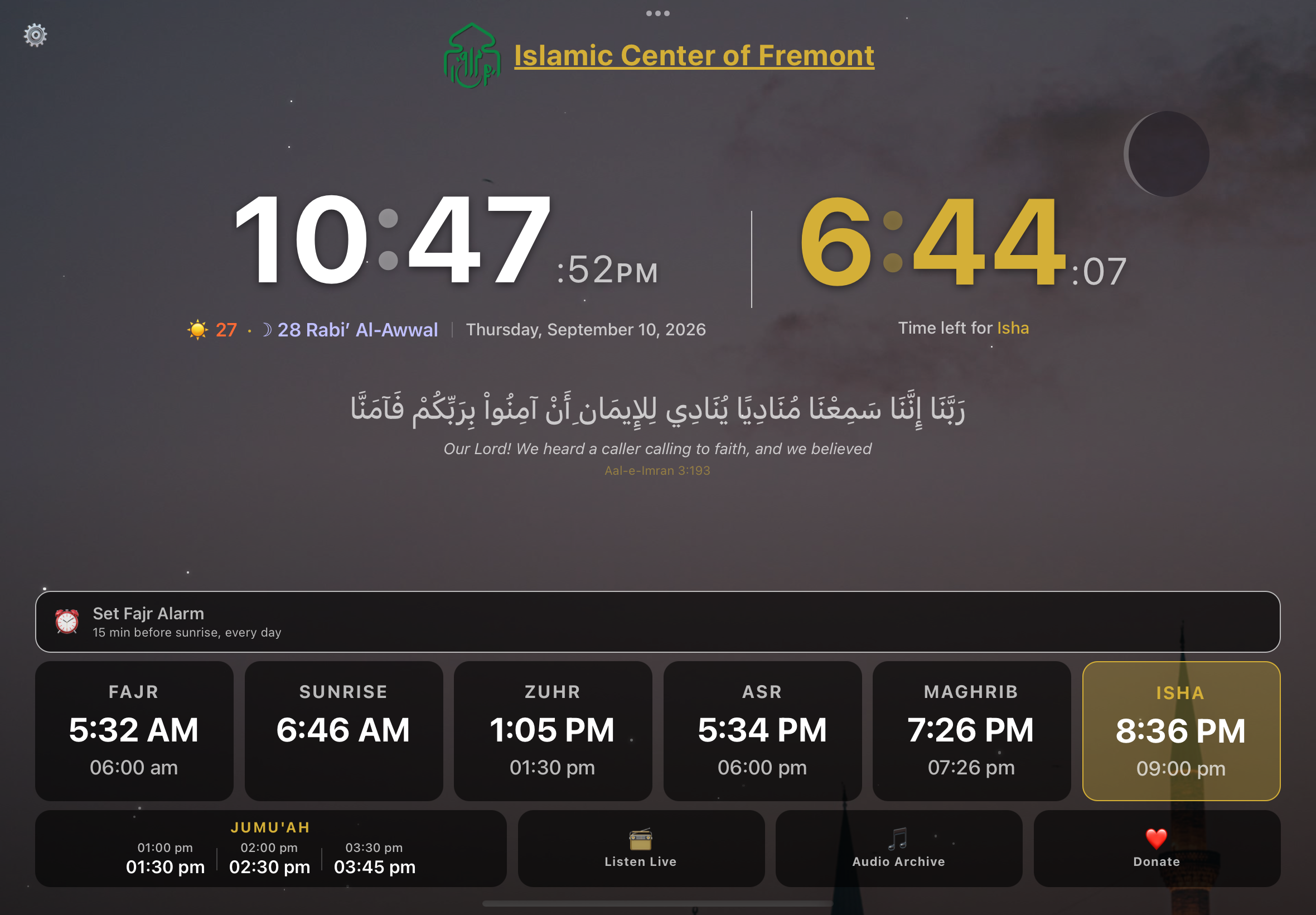
Mount a spare tablet in the kitchen and it shows today’s salah and iqamah times all day, plays the adhan at each prayer, and wakes you for Fajr.
Android tablets and phones, iPhone and iPad, and Macs with Apple silicon
What it does
Adhan at every prayer
Makkah, Madinah or Abdul Basit, at a volume you set, with the dua after adhan if you want it.
Follows your masjid
Point it at a masjid and it uses that masjid’s published iqamah times, so the countdown matches when the jamaah actually stands.
Listen live when the masjid is on air
The moment your masjid starts broadcasting, the display says Live Now with a red dot against it, and one tap puts the khutbah, bayaan or taraweeh through the speaker. Off air it sits quietly as Listen Live. Worth having on a day nobody in the house can get to the masjid. It appears once your masjid has set its broadcast up.
A Fajr alarm that works
Set it relative to Fajr rather than to a clock time, pick a tone, and turn on a puzzle you have to solve to dismiss it.
Iqamah warning
A full-screen alert a set number of minutes before iqamah, so you leave the house on time.
Made to be left on
Keeps the screen awake, dims itself at night, and keeps working when the wifi drops.
Ramadan mode
Suhoor and iftar countdowns, and alerts through the night, with the display shifting to match.
A screen that knows what time it is
The moon on screen is the real one, drawn from tonight’s Hijri date, so it fills and empties across the month the way the one outside your window does. Stars come out around Fajr, Isha and Tahajjud. And after Isha the display dims itself to a level you choose and comes back up at Fajr, working off your masjid’s actual times rather than a fixed clock, so it is never the brightest thing in a dark room. Nine looks to pick from, from a plain Classic through to OLED black for a screen that stays on all night.
Leaving it up on a wall or a shelf
Masjidi Home holds the screen awake on its own, so there is no Auto-Lock setting to go and change. What it cannot do by itself is stay put. A notification slides over the times, someone taps the screen and ends up on the home screen, and the display quietly stops being a display. Two minutes of setup fixes that for good.
Leave it on the charger
A screen that never sleeps will flatten a battery in a few hours. An old phone on a cable behind a shelf, or a tablet on a stand next to a socket, is the usual answer.
Lock it to the app
On iPhone or iPad this is Guided Access: Settings, then Accessibility, then Guided Access. Turn it on and set a passcode. Then open Masjidi Home and triple-click the side button. On Android the same idea is called app pinning or screen pinning, under Settings and then Security, and you pin the app from the Recents screen. Either way the display stays where you put it until you deliberately unlock it.
Quiet everything else
Turn on Do Not Disturb, or a Focus, so messages do not appear over the prayer times. On a spare device you may as well leave it on permanently.
Point it at your masjid
Pick your masjid in settings and the times on screen become the ones it actually publishes, along with its announcements and its live broadcast when it is on air.
Android menus move around between manufacturers: Samsung, Pixel and Xiaomi each file screen pinning somewhere slightly different, so search your settings for "pinning" if it is not where you expect. How you unpin varies too, usually holding Back and Overview together. On iPhone and iPad, triple-click the side button again and enter your Guided Access passcode.
Stuck on any of that?
Message us with what you are looking at and we will walk you through it. Plenty of masjids have done this with someone on the other end of a chat.
Free, and it stays free
There is no paid tier, no trial, and nothing held back. Masjidi is built so masjids keep their own data current, and everyone benefits from that, including anyone who wants to build on the API.
Questions about this one?
A person answers, not a form, not a ticket queue.